Chapter 11 - Bass Mode
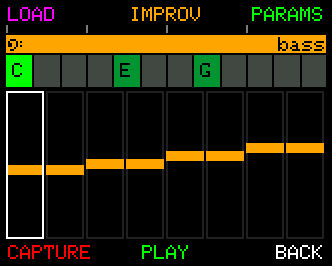
The Bass Track is UNA's third independent voice - a bassline that follows the same chord chain as the Melody Track but with its own parameters, its own captures, and its own way of generating variation.
The editing surface reflects what bass parts actually do in music. Where Melody gives you eight lanes of per-step precision, Bass gives you a single line you can shape by hand plus Improv - a variability-driven system that lets a bassline vary without ever drifting out of key.
Everything happens on this one screen. Choosing a bassline, generating one, editing individual notes and hearing the result are the same activity, not four sub-modes with their own APPLY and CANCEL buttons. Every change is live the moment you make it, and leaving the screen keeps your work - there is nothing to commit.
If you change your mind, that is what UNDO is for.
Getting in and out
From Home, press TRACKS, then BASS.
Press BACK to return to Tracks, and BACK again for Home.
Reading the screen
The bassline is drawn as a row of steps, each with a horizontal bar whose height is that step's pitch relative to the chord's root.
- Top left stays empty most of the time. It is where the pattern name flashes up when SUGGEST lands on one, then gets out of the way so knob values can use the same space.
- Along the bottom: left is the number of steps in the loop, right is the step the cursor is on.
- A cyan bar marks the selected step - the one CONTROL press-and-turn edits. During playback the sounding step gets a white outline as well, so you can see the two independently.
Steps are numbered from 1 on screen, matching the way the panel numbers its knobs and buttons.
The two button layers
The six buttons have two sets of meanings. A tap of the CONTROL Knob switches between them.
| 1 | 2 | 3 | 4 | 5 | 6 | |
|---|---|---|---|---|---|---|
| EASY | SUGGEST | IMPROV | UNDO | CAPTURE | PLAY / STOP | BACK |
| ADVANCED | - | - | PARAMS | SAVE | PLAY / STOP | BACK |
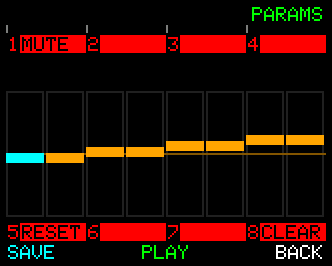
On ADVANCED, the two red bars label what the eight PARAMETER Knobs do when you press them. Each cell shows its knob NUMBER on the left and the action on the right; a cell with a number and no word is a knob that does nothing on this screen.
BACK on ADVANCED returns you to EASY; press BACK again to leave Bass Mode.
UNDO is EASY B3. REDO is on the COMMON row: hold CONTROL and press B3.
SAVE (ADVANCED B4) stores the bassline in one of 16 user slots. Turn CONTROL to pick a slot, press SAVE, then YES to confirm.
Choosing a bassline
SUGGEST (EASY B1) opens the bassline browser: FACTORY (PTN 1-50), USER (your 16 saved lines) or GENERATE. Turn the CONTROL Knob to browse, hearing each one as you land on it. APPLY keeps it, CANCEL puts back what you had. The whole visit is one UNDO step.
Knob 5 is RESET. It puts the whole track back to its defaults - every parameter, and this track's own pattern content with them. It asks first, and the question takes the whole screen - the track view, the knob bars and all - so there is nothing to misread it against. Press it once for a confirm reading Reset / Bass Track? / Params and pattern, then press the same knob again to go through with it. Anything else at all - another knob, another button, a tap of CONTROL - calls it off, and that press is spent cancelling rather than doing its own job. YES sits on button 4 and CANCEL on button 6, so either the knob or the button will do it. A reset also empties the undo history: it is a new starting point rather than another edit to step back through.
RESETandCLEAR(Knob 8) are not the same act, which is why both keep a knob:CLEARflattens the line to the root and leaves every parameter alone.
- Knob 8 (
clear), or COMMON B1, flattens the line back to the root on every step - a blank canvas to build on.
All of them are undoable, so browsing costs you nothing.
The 50 presets are one flat list, numbered PTN 1-50.
A note on what a preset is. Bass presets are pitch sequences - root walks, pedal points, climbs, syncopations. They don't carry gate or velocity values, so each preset plays in whatever rhythmic feel you've set on the Bass Track's own parameters. A walking jazz line and a rock driver loaded into the same gate/velocity setup will read as two different basslines, not two different productions.
GENERATE is the random option: turn CONTROL to pick a seed from 0 to 999. The seed is just a label for the random state, so noting it down means you can come back to the same generated line later.
Editing the line by hand
You can edit the bassline one step at a time, on the same screen:
- Turn the CONTROL Knob to move the cursor along the steps. It wraps at both ends.
- Hold the CONTROL Knob and turn to change the selected step's pitch.
Pitch moves in scale steps relative to the chord, not semitones, so an edited line stays in key as the chord chain moves underneath it. The centre value is the chord's root; you have three steps either side of it. The value stops at each end rather than wrapping, so you cannot accidentally jump the line an octave with one detent.
A dim orange reference line runs across every cell at that centre value, so you can read at a glance which steps sit on the root and which have been pushed above or below it. A step left on the root sits exactly on the line.
The moment you touch a step, the top-left label reads EDITED - the line is no longer the preset it came from.
Knob 1 (mute) on Advanced Mode mutes the bass track, the same switch as the Mixer's.
Undo and redo
Bass Mode remembers the last 16 states of the bassline for as long as you are on the screen.
- UNDO is EASY B3. Keep pressing and you walk back through everything - hand edits, generated lines, clears, browser visits - until you reach the bassline you arrived with.
- REDO is COMMON B3 (hold CONTROL).
- One press undoes one act. A whole press-and-turn edit counts as one however many detents it took, and so does a whole visit to the browser.
- Making a new edit after undoing discards the redo branch, as you would expect.
- Pressing CAPTURE or IMPROV records the state first, so one UNDO steps back over the whole visit.
The history is cleared each time you come into the screen fresh, so UNDO can never take you further back than the bassline you started this visit with. Stepping out to PARAMS, IMPROV or CAPTURE and back does not clear it.
ROOT - what the bassline is built from
The bass takes its root from its own ROOT NOTE setting: LOWEST (the lowest note you played, the default) or DETECT (the chord's real root). Set it in the Bass PARAMS under PITCH, or for all three tracks at once on Scale Options.
IMPROV - variation by variability
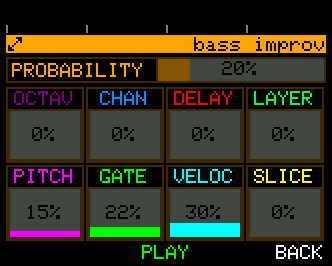
Press IMPROV (EASY B2) for the dedicated Improv configuration page. This is where the nine Improv parameters live, with the most important one - VARIABILITY itself - on the CONTROL Knob.
The screen layout reflects how Improv is wired:
- CONTROL Knob → VARIABILITY (0-100).
-
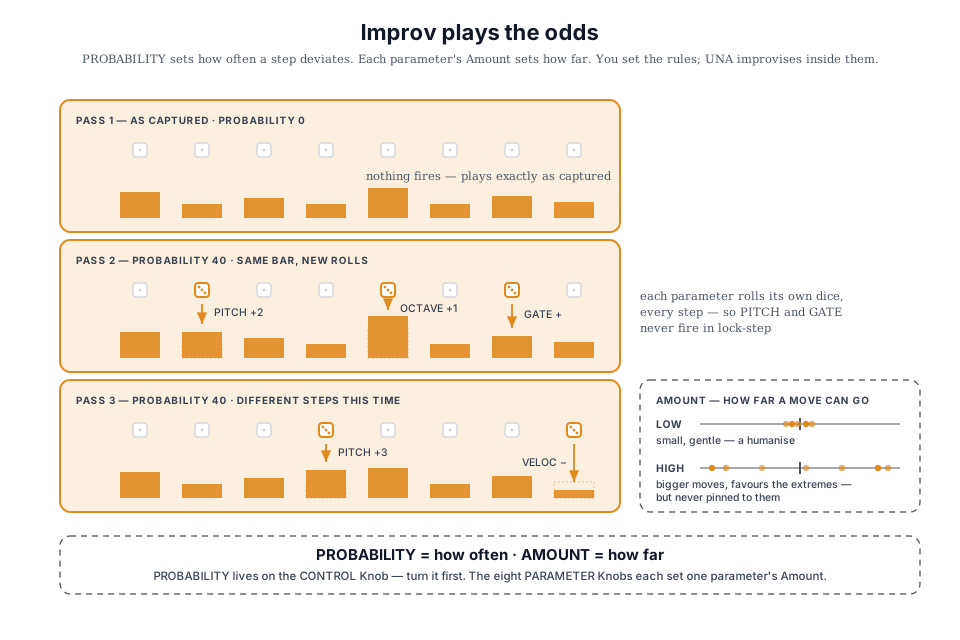
This sets how often a deviation happens. At 0, nothing varies - the bassline plays exactly as written. As you raise it, more steps are deviated. VARIABILITY is rolled independently for each parameter, so the eight parameters don't all land on the same steps. Turn this knob first; everything else is secondary.
-
PARAMETER Knobs 1-8 → the eight Improv parameters.
- Each knob sets how much its parameter deviates - the size of the move, not how often it happens.
The nine parameters:
| Parameter | What its Amount controls |
|---|---|
| VARIABILITY | The master gate - how often any deviation fires (lives on the CONTROL Knob) |
| PITCH | How far the note can drift to nearby scale degrees |
| GATE | How much the gate (note length) varies |
| VELOC | How much the velocity varies |
| SLICE | How much extra subdivision (ratchet) is added |
| OCTAV | How far the step can jump in octaves |
| CHAN | How far the MIDI channel shifts (for split-synth setups) |
| DELAY | How much swing / timing offset is added |
| LAYER | How many extra notes are stacked above the played note |
How a deviation is applied. Each step, every parameter independently rolls against VARIABILITY to decide whether it deviates. When it does, that parameter's own knob - its Amount - decides how far.
Amount doesn't scale the move evenly; it shapes it. At low settings the moves are small and gentle, a subtle humanise that can't make a big jump. As you raise Amount they grow and increasingly favour the parameter's extremes, so high settings reach the full range often - but never every time, keeping the result musical rather than pinned to the maximum.
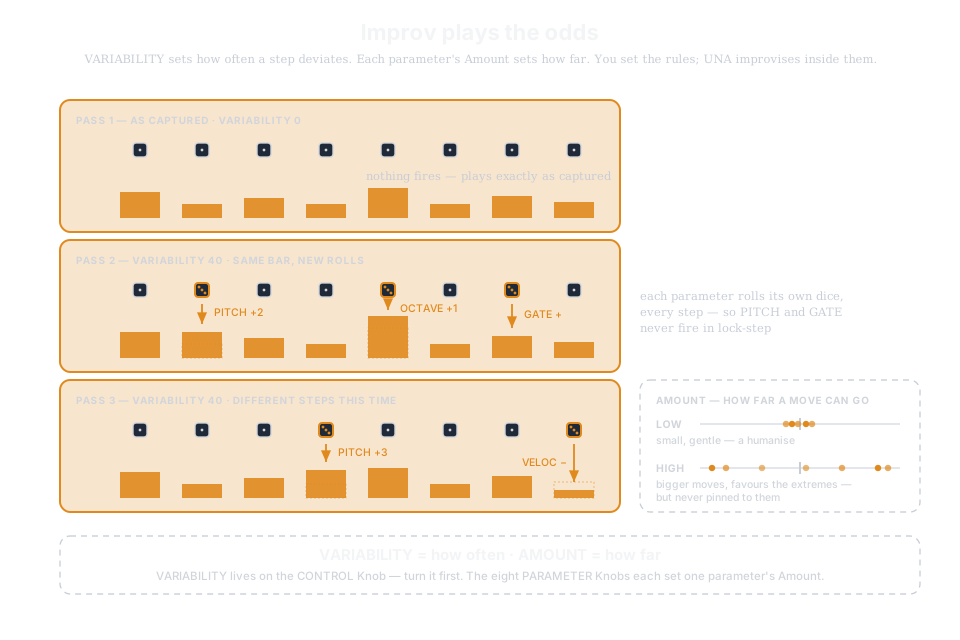
Creating swing. DELAY adds a random timing offset - always forward in time - to the steps it fires on, and, like every other parameter, it's gated by VARIABILITY.
- On the default SWING Delay Type, DELAY only offsets every other step, giving a random, swing variation.
- Set Delay Type to ALL and it can nudge any step.
Press BACK to leave the Improv page.
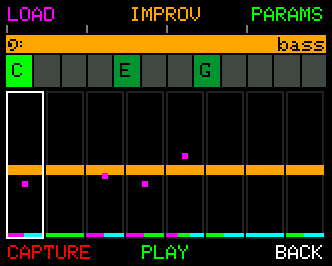
Back on the Bass screen, the per-step variations show as small coloured dots along the foot of each affected step - one slot per Improv parameter, in the same order and colours the Improv page uses. You can see the improv working in real time, and tell at a glance which parameter is moving on which step.
Capturing a bass line
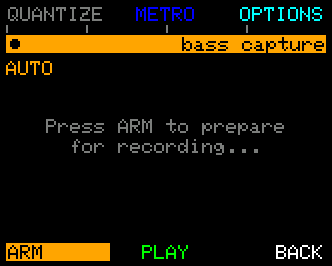
Press CAPTURE (EASY B4) for Bass Record - the same capture model as the Melody Track, applied to the Bass Track.
The mechanics are identical to Melody Record (see Chapter 9), so we won't repeat them here.
The pre-record control layout:
| Function | What it does |
|---|---|
| QUANTIZE / TIME | Set snap grid (or note length in Step Input). |
| METRO | Toggle the click. |
| OPTIONS | Open Bass Record Options. |
| ARM | Prime capture; then START, END, RETRY. |
| APPLY | Commit (after END). |
| BACK / CANCEL | Exit without committing. |
The same after-END loop applies: RETRY to start again, OPTIONS to retune capture settings, APPLY to write the captured phrase into the Bass Track.
Bass and Melody share one set of Record Options, so PLAY ON END and LOOP ON set in one apply to both.
When a take lands, the Bass screen's top-left label reads CAPTURED the next time it flashes, and one press of UNDO steps back over the whole take.
A safety detail: as with Melody capture, applying a fresh Bass capture resets the Lock parameters to OFF - so what you just played is what plays back, uncoloured by old Lock settings.
Track Parameters
Press PARAMS (ADVANCED B3) to open the Bass Track parameters menu. The categories are the same as elsewhere on UNA, with one key difference: instead of Stepper categories, the Bass Track has an IMPROV category (since bass evolves via Improv rather than per-lane editing).
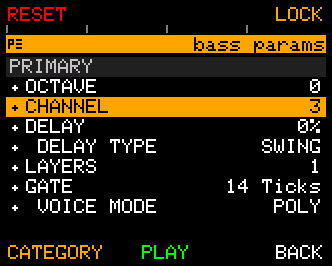
- PRIMARY - the parameters that affect individual notes and steps: OCTAVE, CHANNEL, DELAY, LAYERS, GATE, VELOCITY, PITCH, SLICE, plus the toggle-style parameters MODE, DELAY TYPE, VOICE MODE, SLICE TYPE.
- SECONDARY - the parameters that affect the sequence as a whole: STEPS, ROTATE, JUMP, DIRECTION, TIME, MUTES, ACCENTS.
- LOCKS - OCTAVE, NOTE, CHORD (the same override layer as the other tracks - see Chapter 8).
- IMPROV - the 9 Improv parameters, the same values you also set on the dedicated Improv page via IMPROV on the main Bass Mode screen.
Quick shortcut: you don't have to scroll to reach a parameter. Press a PARAMETER Knob (1-8) to jump the menu highlight straight to that knob's parameter - press a PARAMETER knob for the primary, or press and hold CONTROL + a PARAMETER knob for the secondary.
For a full reference to every parameter - what it controls, its range, and its default - see Chapter 7 - Track Parameters.
The Lock controls
Bass has the same Lock controls as the other tracks:
- LOCK > OCTAVE pins the octave
- LOCK > NOTE overrides the root pitch class
- LOCK > CHORD overrides the chord intervals the bass picks from.
Chapter 8 has the deep dive; everything there applies identically to Bass.
Lock-param edits take effect immediately (the change happens on the next tick, not the next chord change), so you can tweak Lock settings while the bass is playing and hear the result in real time.
Two things called LOCK. The LOCK OCTAVE parameter above pins the bassline's octave - it changes what you hear. The knob-press map's OCT LOCK (PARAMETER Knob 1) is a different thing: it stops the OCTAVE knob being moved by accident. See Chapter 7.
Worked Recipes - for Bass
The "get a bassline in 10 seconds" recipe. From Home: TRACKS → BASS → SUGGEST, then turn the CONTROL Knob until one fits. Press APPLY.
The "make it breathe" recipe. From the bassline above, press IMPROV. Set VARIABILITY (CONTROL Knob) to about 40 - that's roughly how often a step will deviate. Set PITCH (Knob 1) to 20 for a small, gentle drift. The bass will start sliding to a nearby scale note on around 40% of its hits - still grounded, but no longer mechanical. Raise PITCH for bigger leaps, VARIABILITY for more frequent ones.
The "fix one wrong note" recipe. Turn the CONTROL Knob until the cursor sits on the step you don't like, then hold CONTROL and turn to move that note up or down. If you overshoot, UNDO. The whole drag counts as one press of UNDO, not twenty.
The "play your own" recipe. BASS → CAPTURE. Make sure INPUT MODE in OPTIONS is Realtime. ARM. Play the bass line on your keyboard. END. APPLY. The Bass Track now plays what you played; apply Improv on top of it for variation.
The "pedal-point" recipe. Build any chord chain. Enter BASS → ADVANCED → PARAMS → LOCK → NOTE → set to D (or whichever pedal note you want). The chord chain moves; the bass stays anchored on D regardless; a "Pachelbel-style" pedal harmony in seconds.
What's next
Chapter 12 (Modulate) pairs well with Bass: a Modulate slot pointed at one of the Improv parameters will sweep that value up and down over time, giving you a bassline whose variation grows and recedes naturally across a section. Chapter 8's Lock deep dive is also worth a read.