Global Settings
Press the MENU button to enter the global setting menu.
Press the Menu button repeatedly to select each of the multiple global settings.
You can also hold the Menu button and use the Up and Down buttons to select the global settings.
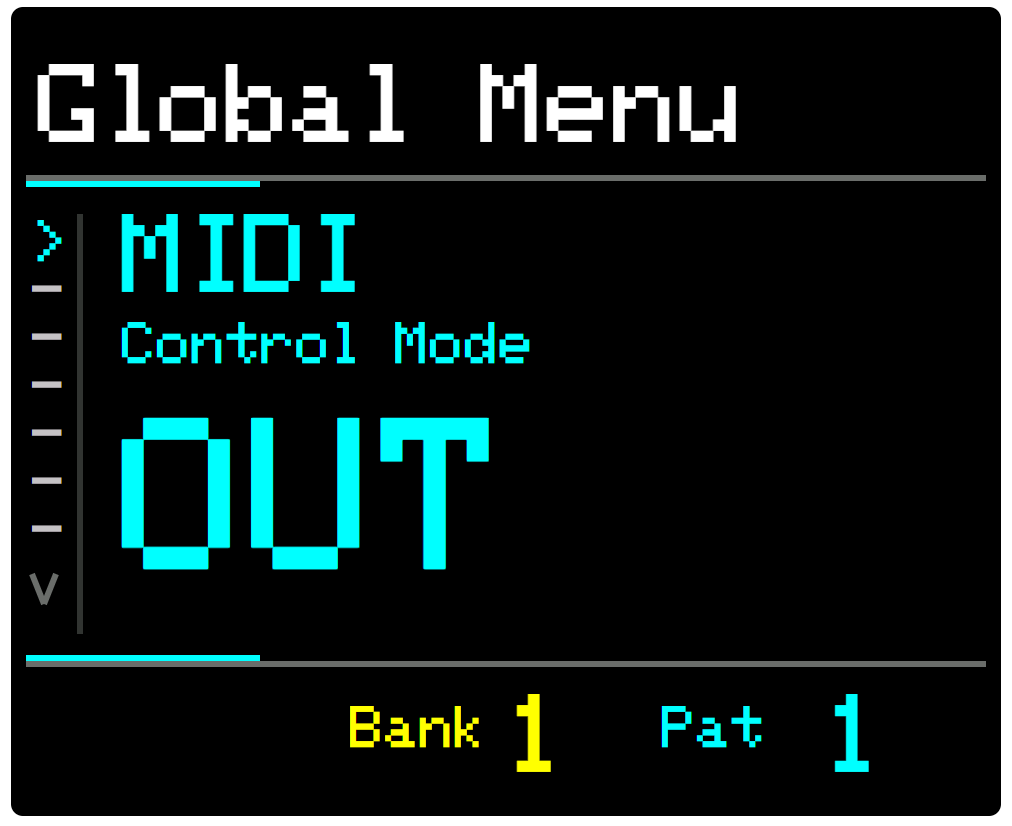
MIDI Control Mode
Set to OFF to isolate ARP from all incoming midi transport/control messages. (Start, Pause, Stop & Clock).
Set to IN to allow control of ARP from an external device via the MIDI In connector or USB port.
Set to OUT to use the Play and Stop buttons to send Start, Continue, Stop, and MIDI Clock messages to external devices via the MIDI Out connector or USB port.
MIDI Thru
Enables or disables throughput of MIDI messages on all channels, via MIDI DIN, USB and USB Host.
MIDI Input Channel (Note Sync)
Arp will sync to incoming MIDI Notes on the specified channel. (See External Note Sync)
Set to Off to disable Input note sync. Set to Omni to sync to note messages on any incoming channel.
MIDI Output Channel (Note Sync)
In order to sync multiple ARPs when Daisy Chaining, ARP will emit MIDI messages for the notes of the current chord, whenever it changes.
Set this to the MIDI Channel that matches the MIDI Input Channel of the ARP you are connecting to.
Set to Off to disable Input note sync.
MIDI Input Arpeggiation Mode
Multiple modes determine how ARP behaves when playing an external MIDI keyboard or other note-input device.
-
ARP DEFAULT Mode is ARP’s unique approach to arpeggiation. It uses the played keys to set the note letters available to the ARPs sequence. In this mode, ARP is responsive to all note input and it is the best way to get the most out of ARP. Read more about how it works here: Appendix V - MIDI Input Modes
-
ONE FINGER Mode allows you to use keyboard notes to select the note and Global Octave. You must select the chord using ARP or assign MIDI CC controls to the Chord selection buttons. If you just want to explore chords this is a handy option.
-
CLASSIC Mode behaves much like a classic synth arpeggiator.
When selected, only the active notes sent from an external device, e.g. the keys pressed on a MIDI keyboard, will be made available to the arpeggiator sequence.
The Steps parameter will be overridden and replaced with the number of active notes.
When ARP is playing and all notes are released, the last active notes will continue to play until new notes are played.
Note that Bounce patterns in Classic mode can give unexpected results. This is because the note pool is limited and some bounce steps may not have a corresponding note. When in doubt, set the bounce value to HOP.
For more information on MIDI Input Modes, please read: Appendix V - MIDI Input Modes
MIDI Input Keyboard Split
This setting lets you specify the MIDI Note, above or below which keyboard notes will be ignored for note sync and live play but will pass through to your sound generating device.
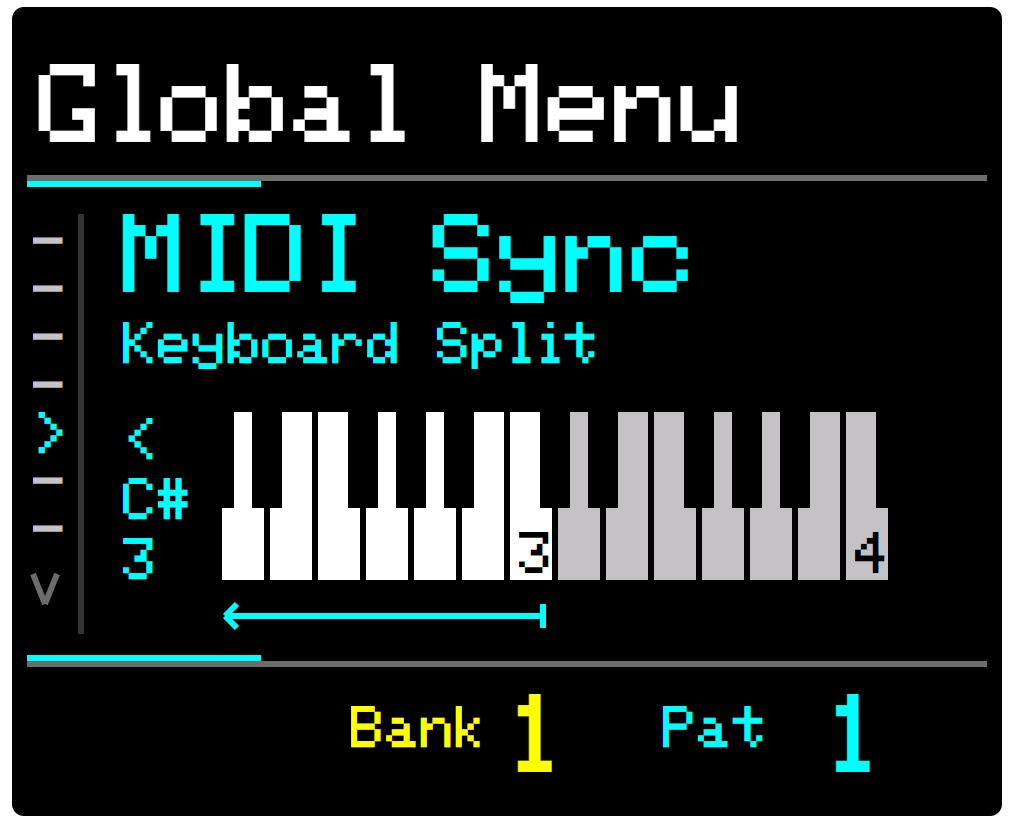
This enables you to “split” an external MIDI keyboard such that one hand can set the chord for ARP and the other hand can, for example, play a melody or bassline that does not affect ARP’s MIDI Input notes.
Options are: - OFF, \< C0 to \< C7, >B6 to >B-1
Live Play on Note Input
Live Play is the triggering of ARP’s sequences on input: when holding NOTE buttons or when sending MIDI Note messages (on the MIDI Input Channel) via an external keyboard or sequencer.
Setting Live Play to Off in the menu will disable this feature. This is useful if you wish to select the Note/Chord or Scale silently before pressing PLAY.
Program Change Channel
Sets the MIDI Channel for incoming Program Change messages. Set this to match the external source for Bank and Patch change messages to be obeyed.
Set to Off to disable or Omni to receive PC messages on all MIDI channels.
CC Output Channel
Sets the MIDI Channel for Control Change output from ARP.
CC Output Channel is used when: -
-
Macros are set to output CC.
-
Macros assigned to the CC Value parameter
-
Modulation Targets are set to CC Value
You can also select the “Per Track” option, which outputs the CC Value for each track on the track’s own MIDI Channel. This makes it possible to send CC on different channels.
Note. If “Per Track” is selected, Macros that are set to output CC will output on Channel 1.
MIDI Output Options
This option enables you to enable/disable specific MIDI Output ports, DIN, USB and HOST, by selecting the ports that you wish to be enabled.
Options: ALL, DIN+USB, DIN+HOST, HOST+USB, DIN ONLY, USB ONLY, HOST ONLY
Stop Play Behaviour
Offers 3 options for how ARP ends playback when pressing the Stop button.
- On Press - Stops playback immediately
- At End of Bar - waits until the end of the current bar before stopping, the last note played will be the last step in the current bar
- On Root/At Start of next bar - waits until the first step of the next bar before stopping. The last note played is the first step of the next bar, so this is usually the root note and resolves the music nicely.
This behaviour also functions when running an external MIDI clock. The internal clock detects the tempo from the external clock and will continue playing at that tempo until the end of the bar/start of the next bar. If these options are enabled.
Patch Change Behaviour
This setting controls how the sequences are triggered when loading patches during playback.
There are 2 options:
-
NON-STOP
-
RETRIGGER
For more information see: Appendix VI - Patch Change Behaviour
Up Down Behaviour
In SET Mode, the UP and DOWN buttons change the value of the selected parameter..
Alternatively, they can be used to navigate the menus.
In the Menu, select Up/Down Behaviour and choose between:
-
Change Value
-
Navigate
Note that if set to Navigate, only the KNOB Control can be used to change a parameter value.
LEDs Brightness
Controls the brightness of the button LEDs. Options: [Low, Medium, High].