Introduction to ARP

Overview
Midicake ARP has 4 polyphonic “arpeggiators” that can be combined and chained together to form complex but repeatable musical sequences.
ARP does not make any sounds. It generates MIDI information that can be used by Synthesizers, Groove Boxes, Samples, DAWs and Plugins.
Each arpeggiator is controlled via a set of configurable parameters. These parameters can be modified independently or all arpeggiators can be controlled together; even while the sequence is playing.
All arpeggiators can share a single MIDI output channel or output on separate channels, allowing for independent sequencing of up to 4 MIDI-compatible sound generators, VSTs or synthesizers.
Sequences are based on a root note and chord which can be changed during playback.
ARP has 16 banks, each with 12 patches that can be saved and recalled, again while the music is playing, providing many creative options.
Each patch consists of 4 independent sequences. These sequences all use the same notes from a shared Chord or Scale, so everything stays in harmony.
Glossary
-
Arpeggiator is an individual sequencer track, ARP has 4.
-
arp or arp track is used informally to mean arpeggiator
-
Sequence is a series of steps that define how the musical melody is constructed
-
A Step is a single event in the sequence that is determined by the parameters
-
Parameters hold the values that are used to construct a sequence
-
A Patch stores 4 sequences, 1 per arp track
-
Each Bank stores up to 12 patches
-
A Note is a single musical note event and is output as a MIDI note, containing Pitch, Gate, Velocity and Channel information
-
Note Letter is used to represent the note regardless of octave. If you play a C1 or a C3 or a C6 the index is the same, it's a C
-
Chord/Scale (Note Set) is set of Note Letters that ARP uses to translate a sequence into notes
-
Root Note is the lowest note in the Chord/Scale (Note Set)
-
Tick is a single MIDI clock tick.
-
Bar (MIDI Bar) is 96 ticks. The bar time depends on Tempo
-
Beat is 24 clock ticks. There are 4 beats in a MIDI Bar
-
Tempo is the speed of playback in Beats per Minute
Key
-
All controls are highlighted in CAPITALS
-
All Parameters are highlighted in Bold
Main Controls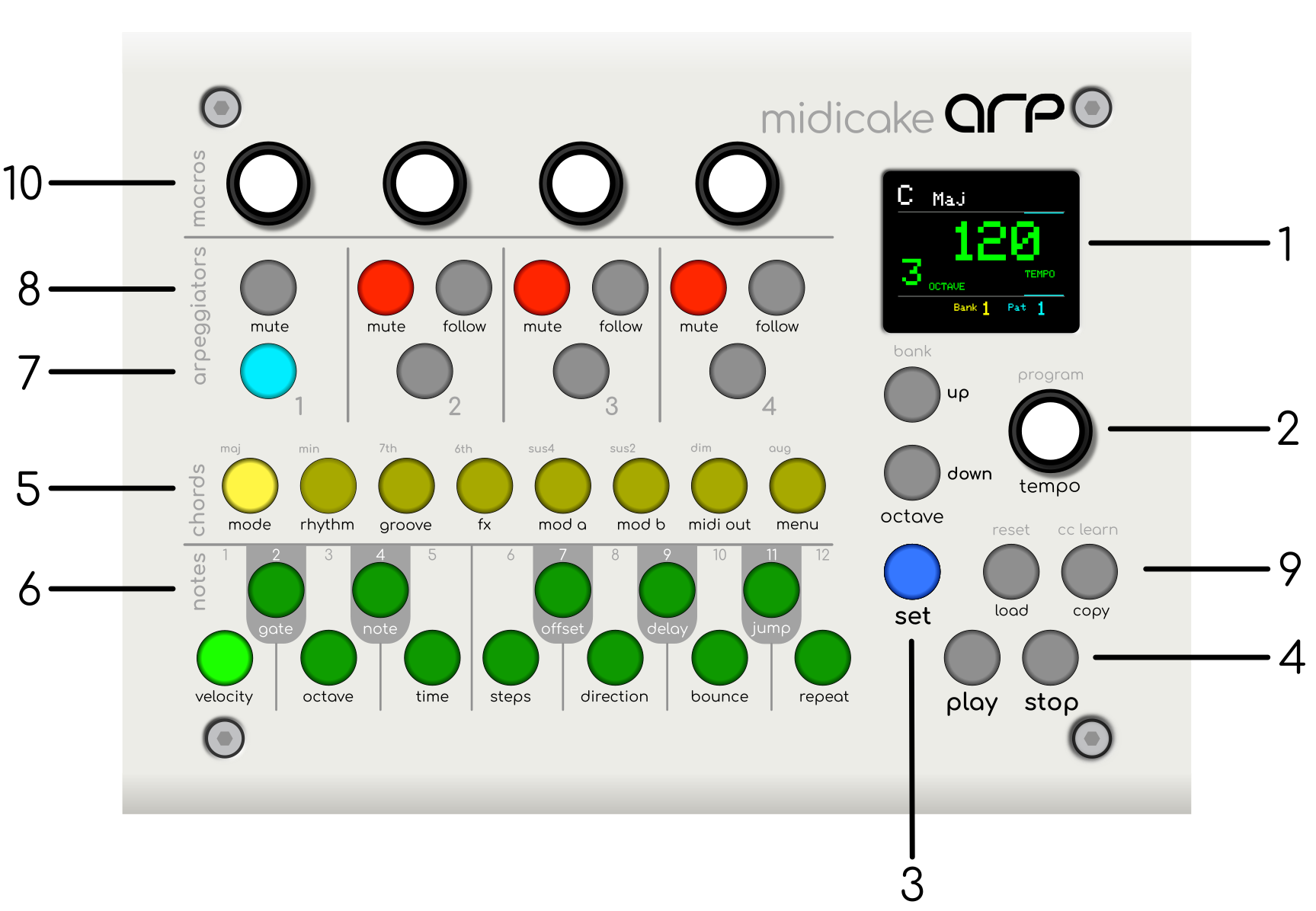 

PLAY Mode
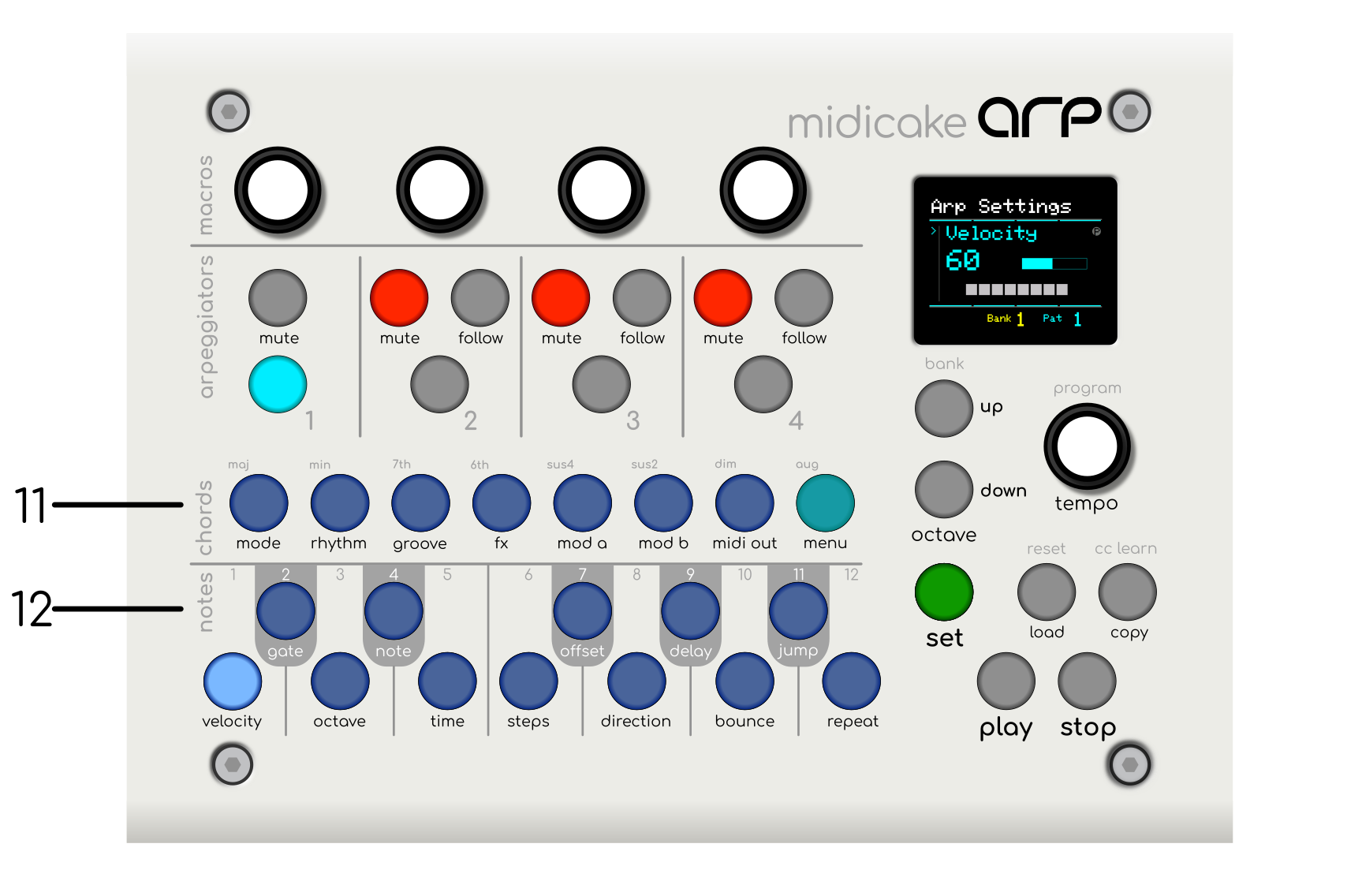
SET Mode
-
LCD Display
-
UP/DOWN Buttons and KNOB Control - (aka PROGRAM Button)
-
SET Button
-
PLAY and STOP Buttons
-
CHORD Buttons - (PLAY Mode)
-
NOTE Buttons - (PLAY Mode)
-
TRACK SELECT Buttons
-
MUTE and FOLLOW Buttons
-
LOAD and COPY Buttons
-
MACROS Controls
-
Behaviour PARAMETER Buttons - (SET Mode)
-
Sequence PARAMETER Buttons - (SET Mode)