Updates and Hardware
Firmware Updates
To see the current firmware version, press and hold the stop button.
To install firmware updates:
-
Download the MidicakeTM ARP firmware package and unzip it somewhere
-
MidicakeTM ARP firmware packages are available via midicake.com
-
-
Download the Teensy Loader
-
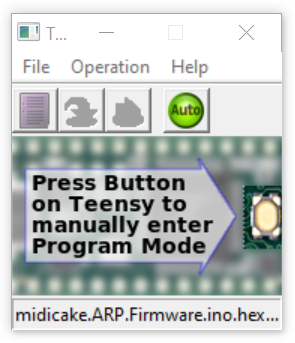
Open the Teensy Loader
-
Select File > Open HEX File, then select the v1.x.x.x_midicake_ARP_Firmware.ino.hex file downloaded in step 1, then click Open
-
Make sure the (green) Auto button is selected.
-
Press the UPDATE button on the back of the unit (next to the USB port).
-
The arp should restart within a couple of seconds with the new firmware.
Note: the firmware version number is displayed on the logo screen at startup and can be shown by holding down the stop button.
Resetting your Device
To reset the unit to its factory defaults…
-
Restart the device by temporarily unplugging the USB cable
-
Hold the RESET button for 2 seconds to enter the BIOS menu
-
There are 2 options:
-
Soft Reset will clear all global settings
-
Full Factory Reset will clear all stored settings including your patches
-
-
-
Press the COPY button to confirm
Warning, all user parameters, patches, patterns, and chords will be lost!
Troubleshooting
Device is not responding?
-
Restart the device by temporarily unplugging the USB cable
Still not working?
-
Restart the device while holding the RESET button, to enter the BIOS menu, and then perform a Soft Reset
-
If it is still not working, please contact us via the website: midicake.com/contact-us

Only One Note heard?
On Play, you only hear the first note played but ARP looks like it’s still playing.
Is your instrument monophonic? Try setting Voice Mode to Mono or reducing the gate value to 1.
Notes keep playing after pressing stop?
This can occur (rarely) when multiple notes of the same pitch are sent to some instruments. Setting an arpeggiator to Mono Voice Mode may help. Pressing Stop 3 times should stop all notes. If all else fails, restart ARP and/or the instrument that’s in a twist.
No sound heard
-
Have you set Velocity to 0 (zero)?
-
Have you set a Binary Pattern for Velocity where all steps are off?
-
Do you have the correct MIDI Channel set for your Synthesizer/VST?
-
Are the outputted MIDI notes within the range of your Synthesizer or VST?
-
Check the Global Settings… Are MIDI Output Options set correctly?
-
Has the cable come out?
Steps Parameter has no effect
If your sequence length does not seem to correspond to the number of steps, check the following:
-
Are you in Classic Mode?
-
In SET Mode, go to Menu >> MIDI Input Arpeggiation Mode and set it to ARP Default
-
-
Do you have a FX or Modulation targeting Note Offset or Octave?
-
Is Pitch Filter set to a number, try setting it to Off?
Mounting Options
ARP has 100mm VESA mounting points on its underside that enable ARP to be attached to a bracket or stand.
IMPORTANT NOTE: Ensure to use M4 bolts that do not intrude into the case by more than 12mm. Exceeding this depth may damage internal components.